Google Gemini Pro Education Discount: Free 1-Year via SheerID Student Verification - Complete Guide
With the release of Gemini 3.0 Pro, Google's education discount offer for AI One Pro has been extended once again! This is the best opportunity to experience Google's most powerful AI model.
This article compiles the latest hands-on guide as of December 2025. As long as you have "Gemini education discount verification eligibility", following this tutorial will let you pass verification at close to 100%, and claim a 1-year Google Gemini Pro membership — a significant freebie.
The tutorial is detailed, but the core steps only take 5 to 10 minutes.
The current Gemini education discount verification has been fully upgraded to the SheerID verification system. Compared with the old method it is stricter, but as long as you master the right approach, you can still pass with ease.
Core content of this article at a glance:
- Eligibility self-check: How to quickly confirm whether your Google account qualifies for verification?
- Verification in practice: How to obtain the SheerID link and complete one-click verification?
- Subscription redemption: How to correctly bind a card (including pitfall-avoidance tips) to claim 12 months of membership?
# 1. Eligibility Self-Check: Can Your Google Account Claim the Discount?
To score a free 1-year Gemini Pro education discount, the first step is to confirm your "ticket" — whether your Google account is eligible to participate in the check.
Official verification link: https://goo.gle/freepro (opens new window)
Click the link above and judge your account status based on the page feedback:
# 1. "Not Eligible" Prompt May Actually Be an IP Issue
If you see the prompt in the screenshot below after opening the page, don't give up just yet. This is most likely a misjudgment caused by your IP address. Solution: Try switching to a US (US region) or Singapore network, then revisit in incognito mode.
Advanced detection tip: To confirm whether it is purely an IP issue, you can try visiting the YouTube Premium subscription page. If you can't even subscribe to YouTube Premium, then it's definitely an IP problem.
YouTube subscription check: https://youtube.com/red (opens new window)
Note:
- Do not log into Google directly with an education email (such as
.eduor.acdomains). You need to apply with an ordinary Gmail account, then associate your education information in the later steps. - If you already have an education email, log in with an ordinary Gmail and authorize via SSO during the verification step.
# 2. A "Hard" Account Problem: Directly Ineligible
If the page explicitly shows "This offer is not available" or "You can't take advantage of this offer", it usually means there is a problem with the account itself. Don't waste time on it — it's recommended to just register a new account.
Common causes:
- A +86 mainland China mobile number was bound during registration.
- The registration environment used a mainland IP or a network outside the offer region.
- The account previously activated Gemini Pro or claimed similar benefits.
# 3. Special Cases: Ghost Eligibility and Loop Eligibility
- Ghost eligibility: It initially shows eligible, then disappears after a refresh. This is extremely rare; it's recommended to switch accounts.
- Loop eligibility: After clicking to claim the offer, you get stuck in an endless loop. This may be because Google's server did not issue a
verificationId.- Solution: Try clearing the browser cache or using incognito mode. If it still doesn't work, it may be a territorial restriction in the account's terms (see image below); it's recommended to switch to a new account.
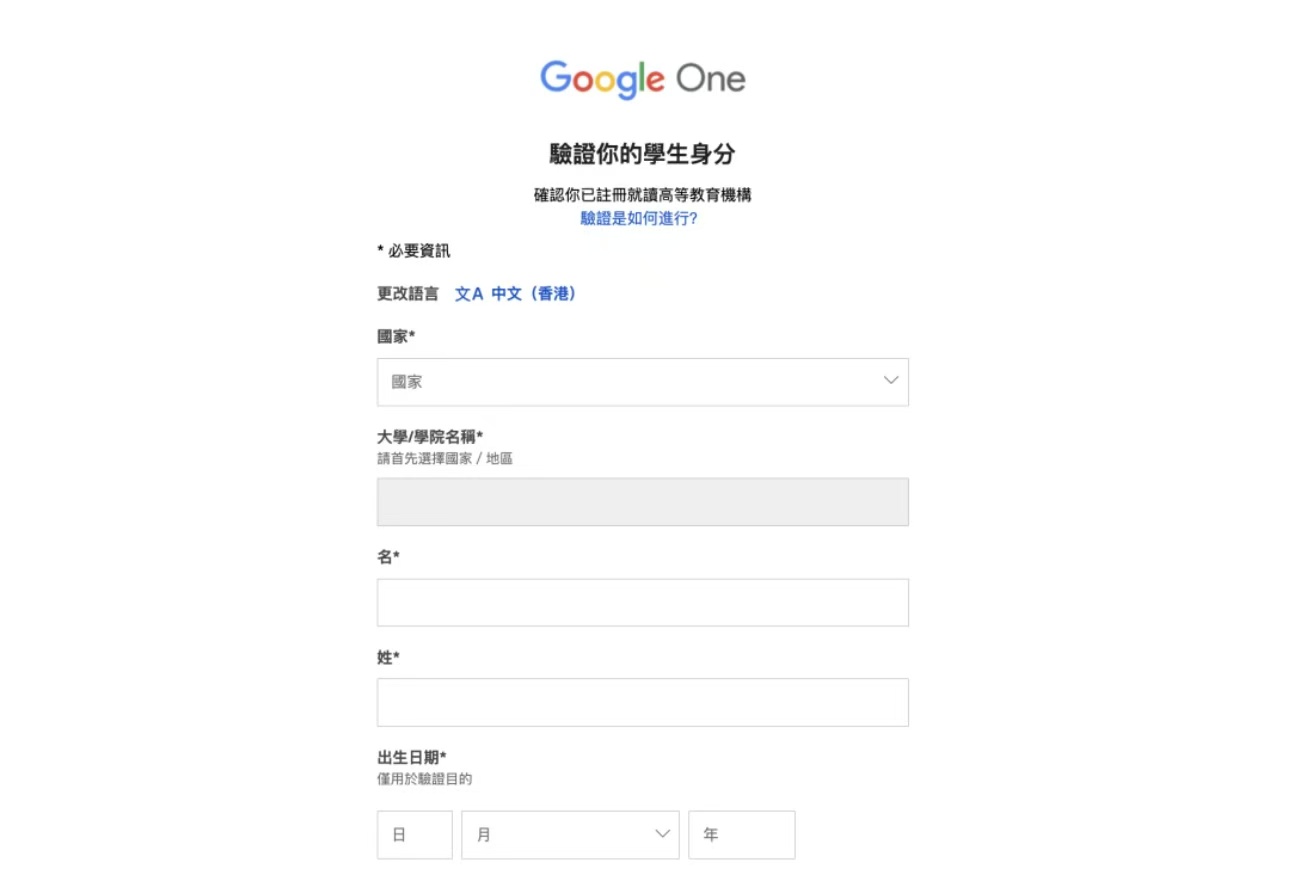
# 4. Perfect State: Verification Form Displayed
When you see the form page shown below, congratulations! Your account is eligible for verification. Next, proceed to the core verification step.
# 
# 2. Hands-On Guide: How to Pass SheerID Student Verification?
Once you're eligible, we need to verify student status through the SheerID system. Even without an education email, you can use tools to achieve "one-click verification".
# Step 1: Get Your SheerID Exclusive Link
Go to the promotion homepage: https://gemini.google/students/ (opens new window)
Click the Get offer button on the page.
Then click Verify eligibility. A new browser tab will automatically pop up (the page with the form to fill in).
Key move: Don't fill in the form directly! Instead, copy the long URL in the browser's address bar. That is the SheerID link containing your exclusive verificationId.
# Step 2: Use the One-Click Verification System
After copying the link, open the SheerID one-click verification tool.
Verification tool address: https://gptplus.org.cn (opens new window)
Paste your SheerID link into the tool and the system will automatically recognize the ID. Click submit, and usually after waiting 1 to 2 minutes the cloud verification will be complete.
# Step 3: Confirm the Verification Result
Once verification passes, return to Google's original form page and refresh the page. The page status will update to verification successful.
Refresh again or return to the offer page, and you'll see the status change to You've been verified. At this point, click Get Google AI Pro to enter the final step.
# Pitfall: Why Did Verification Fail?
In rare cases it fails, mainly due to poor IP quality. If your IP is flagged as fraud by Google or SheerID, verification will be rejected outright.
IP quality self-check tools:
- ipdata.co: Watch the
THREATSindicator, which must be 0. - ping0.cc: Comprehensive IP cleanliness check.
If you run into risk control, switch to a clean IP and wait 24 hours before trying again.
# 3. Final Step: Bind a Card to Activate 12 Months of Membership
This is the most critical step; many people stumble here and end up with only a 1-month trial, missing out on the 1-year benefit.
Dedicated card-binding entry: https://one.google.com/ai-student (opens new window) Make sure the button on the page shows
Get student offerto ensure it is 12 months!
# Card-Binding Notes (Must-Read to Avoid Account Bans):
- Prefer a US-region card: For account safety, it's strongly recommended to use a US-region virtual VISA/MasterCard.
- Avoid mainland cards: Using a dual-currency card issued in mainland China has an 80% probability of invalidating your eligibility.
- Address-filling tips:
- If you insist on using a mainland card, or when using a US-region virtual card, the billing address must be changed to the United States.
- Zip Code: Be sure to enter a zip code from a US tax-free state (such as Oregon, zip 97201, etc.), which allows $0 card binding with no pre-authorized charge.
Click Add Card, enter the card information and save it.
When the system pop-up confirms the subscription details, double-check that it is 12 months and that the amount is 0 (in the tax-free case). Click Subscribe.
After a short wait, once you see "Subscribed", congratulations! You have successfully unlocked Google AI One Pro 2TB benefits and access to the Gemini Advanced model.
# Final Step: Cancel Auto-Renewal
To avoid being charged next year if you forget to cancel (US$19.99/month), it's recommended to cancel auto-renewal right away. This won't affect the 1-year benefit you've already claimed.
Path: Gemini homepage -> Settings -> Manage Subscription -> Change Payment Method -> Manage -> Cancel Subscription.
Summary: The key to the 2025 Gemini education discount lies in IP cleanliness and correctly obtaining the SheerID link. By following the methods in this tutorial, combined with binding a card with a tax-free state address, you can experience Google's most cutting-edge AI technology at zero cost. Act now!
# Related Reading & Recommended Guides
- ⚡ 2026 Google I/O Latest Release: How to Use gemini3.5flash? 5 Quick Access Channels (opens new window)
- 🚀 Gemini 3.1 Pro In-Depth Review and Access Guide (opens new window)
- 🎓 Gemini Student Discount SheerID Verification Tutorial: 1 Year Free (opens new window)
- 📖 Complete Guide to Gemini Student Discount (opens new window)
- 🔍 How to Use Gemini 3 in Mainland China: Comprehensive Trial Tutorial (opens new window)
- 🌐 GPT Plus Home (https://gptplus.org.cn/en/) (opens new window)